Case Study
Why Astro SSG for this Portfolio
Static content deserves static tooling. A portfolio has no runtime state, no user authentication, no real-time data — just pre-written text and images. Astro ships zero JavaScript by default, giving you pre-rendered HTML, instant loads, and perfect SEO out of the box.
Role
Solo Developer
Timeline
1 week
Type
Personal Project
Stack
Astro 5 · Tailwind · TypeScript
0.2s
FCP (Time to First Paint)
100
Lighthouse Performance
0 KB
React Runtime
7
npm Packages
01
Problem & Solution
What the React Version Shipped
The original portfolio was built with React 18 + Vite — a solid stack for an interactive application. But this site is 100% static content with only three interactive elements: scroll reveals, a mobile menu, and a typing effect. React was massive overkill.
- — ~350 KB JS — React runtime + React Router + all component libraries shipped on every page load
- — Empty HTML shell — The browser downloaded the page, then had to fetch, parse, and execute JS before rendering any content
- — 32 npm packages — Including react, react-dom, react-router-dom, tech-stack-icons, lucide-react, @radix-ui/*, tailwindcss-animate, and more
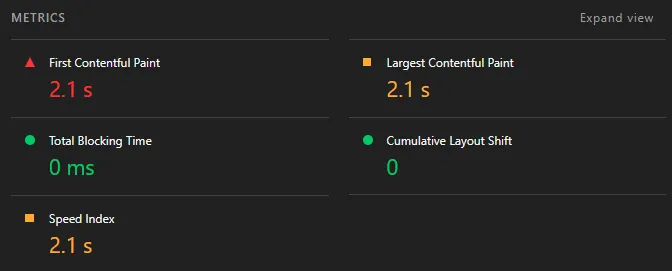
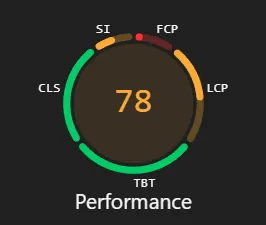
- — Lighthouse Performance: 78 — FCP of 2.1s, LCP of 2.1s — the browser waits for JS before showing any content
The Solution — Astro SSG
Astro's zero-JS-by-default model forced the right question at every component: does this actually need to run in the browser? The answer was almost always no.
- — Pre-rendered HTML — Content is visible immediately — no JS bundle to download, parse, or execute before first paint
- — Zero runtime by default — Astro ships static HTML + CSS. Client-side JS is opt-in at the component level, not the default
- — Perfect SEO out of the box — Search engines get complete HTML — no hydration delay, no empty shells, no rendering budget wasted
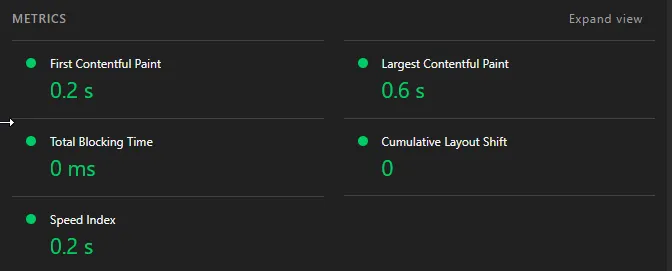
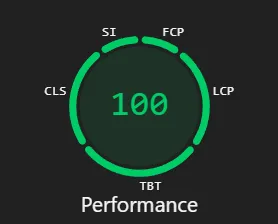
- — Lighthouse Performance: 100 — FCP of 0.2s, LCP of 0.6s — a 22-point gain from choosing the right abstraction level
02
Decision Log
Framework Choice
Astro over Next.js or Remix
Next.js and Remix both default to server-side concerns or React islands. Astro is specifically designed for content-first sites — it ships zero JS by default and lets you opt in to interactivity at the component level. A portfolio with no data fetching and no user state has no business using Next.js.
Tradeoff
Astro is less familiar than Next.js. Acceptable trade-off: the simpler mental model pays back quickly.
Interactivity Strategy
Zero React islands — vanilla TypeScript modules
The entire site needed exactly three JS behaviours: scroll reveals (IntersectionObserver), header scroll detection + mobile menu, and a hero typing effect. Each is ~15 lines of vanilla TS. Hydrating a React component for any of these would be grotesque.
Tradeoff
No shared state between interactive elements. Not a problem — these three behaviours are fully independent.
Icon Strategy
Inline SVGs instead of tech-stack-icons
tech-stack-icons is a React component library that wraps SVG data. In Astro, SVGs render at build time to static HTML — no runtime cost. By extracting the SVG strings from the package's dist bundle and embedding them in a TypeScript data file, we get identical visuals with zero JS shipped.
Tradeoff
SVG strings make the data file large (~60KB source). Irrelevant — it's build-time data, not shipped JS.
Reveal Animations
Single shared IntersectionObserver script
The React version had one useReveal hook per component — 15+ IntersectionObserver instances across the page. The Astro version registers one observer per [data-reveal] element from a single script that runs once on DOMContentLoaded. Simpler, cheaper, and easier to reason about.
Tradeoff
CSS handles the animation state (opacity + transform via .is-visible class). Marginally more verbose HTML, zero runtime overhead.
03
Page Load Flow
Before — React 18 SPA
Browser requests /
Server responds with empty HTML shell
Browser downloads JS bundle
~350 KB · React runtime + all components
JS parses + executes
Main thread blocked while bundle is processed
React hydrates
Builds virtual DOM, reconciles, renders
Content visible
FCP: 2.1s · user waited over 2 seconds
After — Astro 5 SSG
Browser requests /
Server responds with complete pre-rendered HTML
Browser renders HTML
Content visible immediately — FCP: 0.2s
CSS loads
Tailwind utility classes, no layout shift
Small JS modules load
~4 KB · reveal.ts + header.ts + hero-typing.ts
Animations activate
IntersectionObserver triggers reveals — TBT: 0ms
04
Results
Performance
78 → 100
22-point gain. Pre-rendered HTML + self-hosted fonts means content is immediately visible — no hydration wait.
FCP
2.1s → 0.2s
90% faster. The browser gets complete HTML — no JS needed to show content.
LCP
2.1s → 0.6s
71% faster. The hero text is in the HTML, not injected by React after bundle execution.
SEO
88 → 100
Slightly better score, different reality. The SPA serves an empty shell — Astro serves complete HTML that search engines can read immediately.
Before — React 18 SPA
After — Astro SSG
05
Reflection
React is excellent for applications with complex state, real-time data, and rich user interaction. A portfolio with pre-written content, no backend, and three CSS-triggerable animations is not that application. Choosing the right abstraction level — not the familiar one — is an engineering skill worth practising.
Astro made the trade-offs explicit. Every component defaults to static HTML; adding client-side behaviour is a deliberate opt-in. The result is a lean 7 packages only project, zero runtime JS by default, and a set of pre-rendered HTML files that load instantly on any connection.
The migration took one week. The performance improvement was immediate and dramatic — proof that choosing the right tool matters more than optimising the wrong one.